Can AI crawl JavaScript? How to check what the crawler actually got
Can AI crawl JavaScript? Mostly not — which is why a page can return 200 and still say nothing. Here is the one command that shows what the crawler received, and three fixes with their costs.

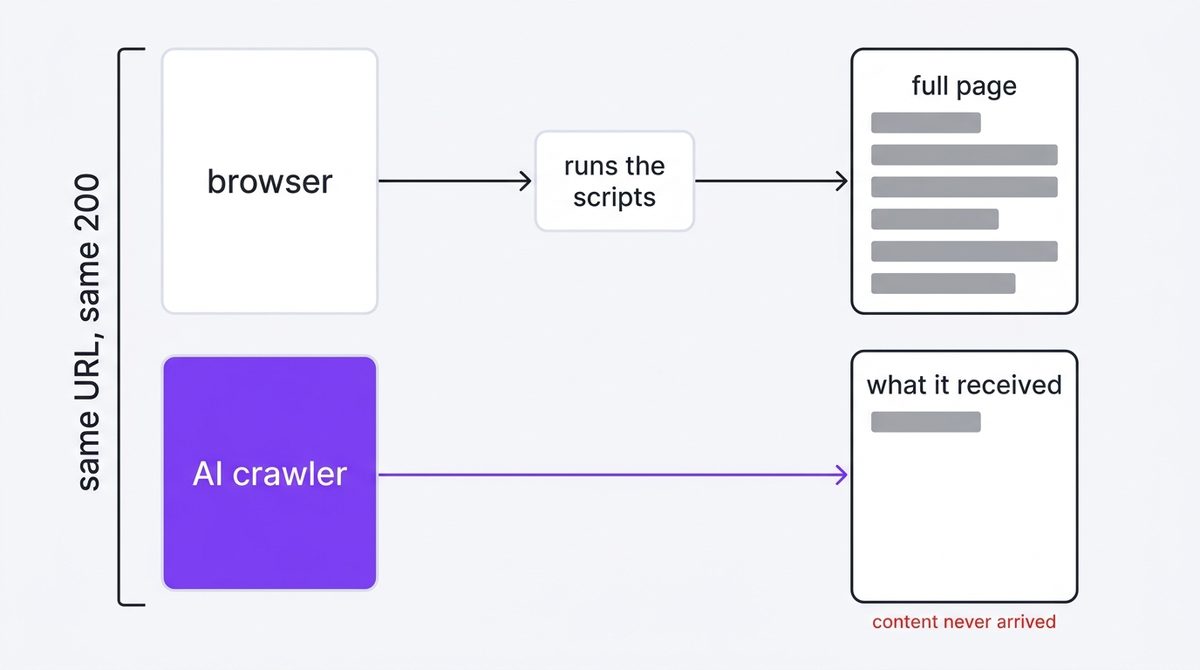
Can AI crawl JavaScript? Mostly no — and that is the difference between a page that returns 200 and a page that says anything. Search engines render JavaScript on their own schedule; the AI crawlers that feed answer engines generally take the HTML as delivered. If your text arrives by script, the crawler receives an empty frame and moves on, with no error anywhere to tell you.
Read this first
This chapter is the layer below how to check if AI can read your site. That check asks whether bytes come back. This one asks whether those bytes contain your content, which is a different question with the same status code.
Why a 200 can still be an empty page
A browser downloads your HTML, runs the JavaScript, fetches more data, then paints the text you see. A crawler that does not execute scripts stops at step one. Whatever the server sent is all it gets — and on a client-rendered site, that is a shell of markup with the content missing.
Your browser is the worst possible tool for checking this, because it is the one client guaranteed to fill in the gap.
How to check what the crawler actually received
Fetch the page as a crawler, strip the scripts and tags, and count what is left. If the number is small on a page you know is long, the content is not in the HTML.
URL="https://example.com/"

curl -s -A "Mozilla/5.0 (compatible; OAI-SearchBot/1.4; +https://openai.com/searchbot)" "$URL" \
| python3 -c "
import sys, re, html
raw = sys.stdin.read()
body = re.sub(r'(?is)<script.*?</script>', '', raw)
body = re.sub(r'(?is)<style.*?</style>', '', body)
txt  = html.unescape(re.sub(r'<[^>]+>', ' ', body))
txt  = re.sub(r'\s+', ' ', txt).strip()
print('raw bytes      ', len(raw))
print('readable text  ', len(txt))
print('h1 present     ', bool(re.search(r'(?i)<h1[\s>]', raw)))
print(txt[:300])
"
The last line prints the opening of what a crawler can read. If that is a cookie notice, a nav menu, or nothing at all, you have found your problem.
Can AI crawl JavaScript on your deep pages too?
Test at least three URLs, because the answer often differs within one site. Homepages are frequently hand-built and server-rendered while the actual content lives in an app that is not. Run the command against your homepage, one article or product page, and one page that sits behind a filter or a tab.
The pattern we see most often is a homepage that passes and an article template that does not, which is the worst arrangement available: the page you check looks fine, and every page you actually want cited is empty. Testing one URL and declaring the site healthy is the single most common way this check gets misused.
for u in \
  "https://example.com/" \
  "https://example.com/blog/some-article" \
  "https://example.com/products?filter=new"
do
  n=$(curl -s -A "Mozilla/5.0 (compatible; OAI-SearchBot/1.4; +https://openai.com/searchbot)" "$u" \
      | sed -e 's/<[^>]*>/ /g' | tr -s ' \n' ' ' | wc -c)
  printf '%-52s %s\n' "$u" "$n"
done
This rougher one-liner does not strip scripts, so its numbers run high — it is for comparing pages on the same site against each other, not for absolute judgements.
Reading the number
There is no universal threshold, so compare against the page itself rather than against a benchmark. A 2,000-word article should yield something in the low thousands of characters.
| What you see | Reading |
|---|---|
| Readable text roughly matches the visible article | Fine. Server-rendered or pre-rendered. |
| A few hundred characters, all of it nav and footer | Client-rendered. The crawler sees nothing of value. |
| Large raw byte count, tiny readable text | The payload is script and data, not content. |
No h1 at all | The document has no headline before scripts run. |
Three ways to fix it, and what each costs
These are ordered by cost. Most sites need only the first, and it is worth confirming which mode you are in before rebuilding anything.
| Fix | Good for | Cost |
|---|---|---|
| Pre-render at build time | Content that changes rarely: posts, docs, marketing pages | Lowest. Usually a framework setting. |
| Render on the server per request | Content that is personalised or changes constantly | Medium. Real infrastructure work. |
| Ship the key content in the initial HTML, hydrate the rest | Apps where only part of the page is content | Lowest impact on the app, needs a deliberate split. |
🚫 What is not on this list is serving different HTML to crawlers than to people. That is a separate and much riskier decision, and it is not the fix for this problem.
Confirming the fix actually landed
After you change the rendering mode, re-run the original command and compare against the number you wrote down. This matters more than it sounds, because build settings that claim to pre-render sometimes only pre-render the routes you listed, and the one you care about was not on the list.
Three things should change together in a real fix: readable character count rises to roughly match the visible article, an h1 appears in the delivered HTML, and the opening of the extracted text is your actual first paragraph rather than a nav menu. If the character count rose but the text still opens with navigation, the content is present but buried, and extraction will still favour a competitor whose answer starts at the top.
Give it one more pass after deployment rather than testing a preview build. Preview environments frequently render differently from production, and the whole point of this check is to see what the public URL serves.
What about the engines that do render
Google renders JavaScript, but on a queue: crawling and rendering are separate stages, and the gap between them can stretch. So a client-rendered page is not invisible to Google, it is slow to Google — and it is invisible to any crawler that never renders at all.
That split is why this chapter sits in the handbook rather than in a general SEO guide. If Google were the only consumer, client-side rendering would be a performance question. Because answer engines pull from crawlers that mostly do not render, it becomes a visibility question, and the cost lands on exactly the surfaces this handbook is about.
Three ways this goes wrong
All three end in a confident conclusion drawn from the wrong client.
- Checking with view-source in a browser. Some browsers show you the rendered DOM rather than the delivered document, which hides the entire problem. Fetch with
curl, not a tab. - Assuming Google's rendering means everyone renders. Google does render JavaScript, on its own schedule. That says nothing about the crawlers feeding answer engines, and those are the ones this handbook is about.
- Fixing the homepage and stopping. Homepages are often the most hand-built page on a site. Test a deep article too; the results frequently differ.
Common questions
Does Google render JavaScript?
Yes, though rendering is queued separately from crawling and can lag. The practical point for this chapter is that Google is the most capable client in the set, so passing with Google tells you little about the others.
What is a safe amount of readable text?
We will not give you a number, because it depends entirely on how long the page is meant to be. The comparison that matters is between what a reader sees and what the fetch returns — a large gap is the finding, not any absolute figure.
My framework says it does server-side rendering. Do I still need to check?
Yes, and this is where most surprises come from. Frameworks that render on the server can still end up shipping empty pages when a component fetches its data on the client, when a route opts out of static generation, or when a content block is wrapped in something that only mounts in a browser. The setting describes the intent; the fetch describes the result.
Is an empty shell also bad for Google rankings?
It is at minimum a delay, because rendering is a second pass that happens later. Whether it costs ranking is not something we have measured on our own sites, and we are not going to assert it.
Next step
If the fetch returned your article, this layer is clear and the remaining questions are about what the content says rather than whether it arrives. If it returned a shell, fix that before any rewriting — every later chapter assumes the crawler can read the words you are editing.
We ran this exact check across fifteen well-known sites and found readable text ranging from 342 to 25,082 characters; the numbers are in what AI crawlers get from JavaScript sites. Getting a fix written, published and pushed for indexing is where most sites stall.
Part of the QueryWin handbook · Level 2