How to check if AI can read your site (in one command)
To check if AI can read your site, send one request per AI crawler and read the status code. Here is the command, the twelve crawlers worth testing, and the two you cannot test at all.

The fastest way to check if AI can read your site is to knock on the door as each AI crawler and read the status code. A 200 means that crawler reached your page. A 403, a redirect to a challenge page, or a timeout means something in front of your site turned it away — and nothing in your robots.txt will tell you that. The whole check takes about two minutes and needs no account or plugin.
What "can AI read my site" actually means
It means one narrow thing: when an AI crawler sends an HTTP request for your URL, does your infrastructure hand the page back? Not whether you allowed it in robots.txt. Not whether the crawler wants your content. Whether the bytes came back.
This is step one of the handbook because every later step assumes it passed — a page that cannot be fetched cannot be indexed, ranked, or cited.
Why a green robots.txt tells you nothing
robots.txt states your intent. It is a text file that crawlers choose to obey; it blocks nothing by itself. Three layers decide whether a request succeeds: what robots.txt allows, what your CDN or WAF does at the edge, and what your origin server returns. The edge is usually the layer that says no, and it does not appear in robots.txt at all.
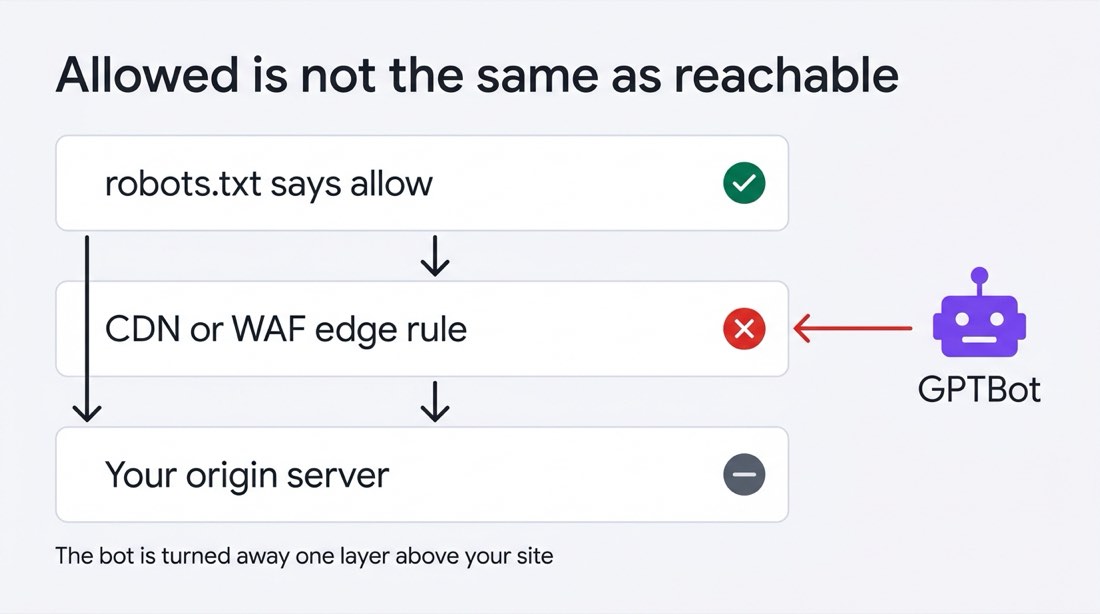
robots.txt is what you intend. Your CDN is what actually happens.
Managed hosts and CDNs ship bot rules that are switched on by default and updated without asking you. You can write a perfect Allow line and still return 403 to every AI crawler on the internet.
Check if AI can read your site in one command
Change SITE to your own URL and paste this into a terminal. One request per crawler, status code only, nothing but curl needed.
SITE="https://example.com/"

while IFS='|' read -r name ua; do
  [ -z "$name" ] && continue
  code=$(curl -s -o /dev/null -m 20 -w "%{http_code}" -A "$ua" "$SITE")
  printf '%-20s %s\n' "$name" "$code"
done <<'BOTS'
OAI-SearchBot|Mozilla/5.0 (compatible; OAI-SearchBot/1.4; +https://openai.com/searchbot)
ChatGPT-User|Mozilla/5.0 (compatible; ChatGPT-User/1.0; +https://openai.com/bot)
GPTBot|Mozilla/5.0 (compatible; GPTBot/1.4; +https://openai.com/gptbot)
PerplexityBot|Mozilla/5.0 (compatible; PerplexityBot/1.0; +https://perplexity.ai/perplexitybot)
Perplexity-User|Mozilla/5.0 (compatible; Perplexity-User/1.0; +https://perplexity.ai/perplexity-user)
Claude-SearchBot|Mozilla/5.0 (compatible; Claude-SearchBot/1.0)
Claude-User|Mozilla/5.0 (compatible; Claude-User/1.0)
ClaudeBot|Mozilla/5.0 (compatible; ClaudeBot/1.0)
Googlebot|Mozilla/5.0 (compatible; Googlebot/2.1; +http://www.google.com/bot.html)
bingbot|Mozilla/5.0 (compatible; bingbot/2.0; +http://www.bing.com/bingbot.htm)
meta-externalagent|meta-externalagent/1.1
CCBot|CCBot/2.0 (https://commoncrawl.org/faq/)
BOTS
Real output, run on 14 August 2026 against a live site, sizemarker.com:
OAI-SearchBot        200
ChatGPT-User         200
GPTBot               200
PerplexityBot        200
Perplexity-User      200
Claude-SearchBot     200
Claude-User          200
ClaudeBot            200
Googlebot            200
bingbot              200
meta-externalagent   200
CCBot                200
Twelve lines, twelve 200s. Four seconds.
Why the short user agent strings are enough
Edge bot rules match on the token — GPTBot, PerplexityBot — not on the full browser-style string around it. OpenAI and Perplexity publish their complete strings; Anthropic publishes bot names and IP ranges but not full user agent strings, so the lines above use the documented token in a minimal wrapper. Where full strings exist, copy them from the official pages linked below.
Which AI crawlers are worth testing
Not all of them do the same job, and the difference decides how much a block costs you. Search crawlers feed the answers users see today. Training crawlers feed models released next year. Blocking the first group makes you invisible; blocking the second is a business decision, not a visibility problem.
| Token | Job | Cost of blocking |
|---|---|---|
OAI-SearchBot | Indexes pages for ChatGPT search | High — you drop out of ChatGPT's source pool |
ChatGPT-User | Fetches a page when a user's question needs it | High — you lose live fetches |
PerplexityBot | Indexes pages for Perplexity results | High |
Perplexity-User | User-triggered fetch | High |
Claude-SearchBot | Improves Claude's search results | High |
Claude-User | User-triggered fetch | High |
Googlebot | Google's index, which feeds AI Overviews and AI Mode | Critical |
bingbot | Bing's index, which feeds Copilot | High |
GPTBot | Model training | Your call |
ClaudeBot | Model training | Your call |
meta-externalagent | Model training and product indexing | Your call |
CCBot | Common Crawl's public archive, used by many model builders | Your call |
Sources for the strings and purposes: OpenAI, Perplexity, Anthropic, Google, Meta.
Two names you cannot test at all
Google-Extended and Applebot-Extended never send a request. They are robots.txt control tokens, not crawlers. Google's documentation says Google-Extended "doesn't have a separate HTTP request user agent string"; Apple's says Applebot-Extended "does not crawl webpages" and only governs how content already collected by Applebot may be used.
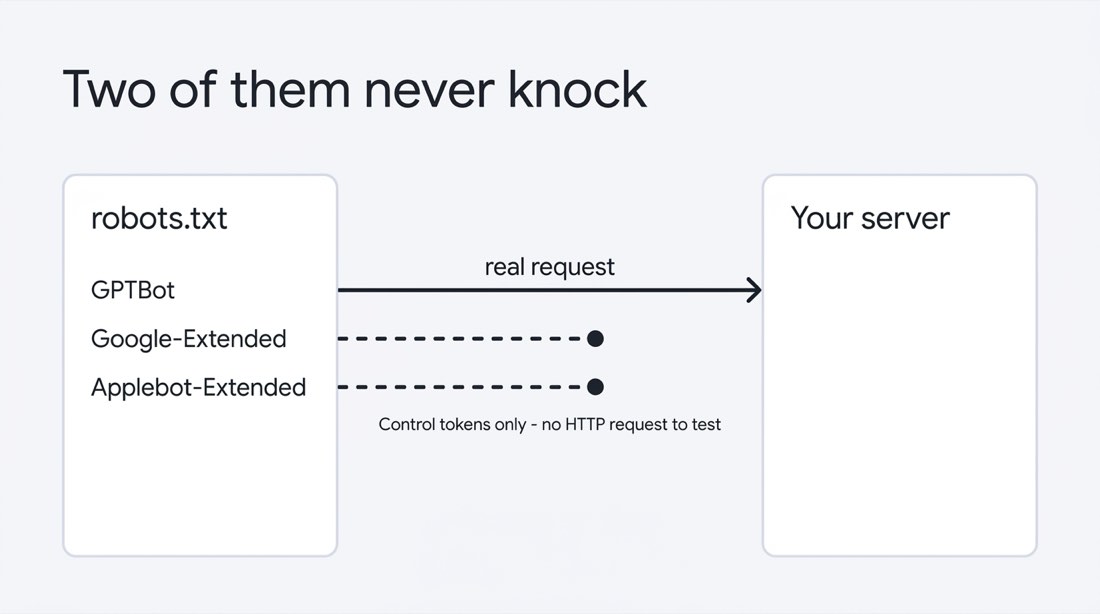
So a checker reporting "Google-Extended: allowed" is reporting your robots.txt, not what happened on the wire. There is no request to observe. Both are settled by editing robots.txt, and no live test can verify the result — including this one.
What each response means
Read the code first, then read the body. These six cover nearly everything a crawler gets back from an ordinary site — and only one of them, 200, can still be lying to you.
| Code | Reading | Do next |
|---|---|---|
200 | Reached your page | Nothing — but check the body, see below |
301 / 302 | Redirected | Re-run with -L; a redirect into a login or challenge page is a block wearing a disguise |
403 | Refused, almost always at the edge | Look for a bot-management rule in your CDN, not in robots.txt |
429 | Rate limited | Usually survivable; crawlers back off and retry |
503 | Served a challenge or an interstitial | Treat as a block — crawlers do not solve challenges |
000 | Connection never completed | TLS or firewall problem; try the same request from another network |
Three ways this check misleads you
The check is fast because it is shallow. Three limits are worth knowing before you trust a clean run.
- It uses your IP address, not the crawler's. Rules that block by IP range or ASN — which is how several bot-management products actually work — stay invisible to this test. A clean
200here does not prove the real crawler gets one. Server logs settle that, and they are a later chapter. - It tests one URL. Edge rules are frequently path-scoped. Run the loop against your homepage, one deep article, and one page behind a form, then compare.
- A
200can still be an empty page. If your content renders client-side, crawlers may receive a shell. Add-o page.htmland grep for a sentence you know is in the article; if it is missing from the HTML, the crawler did not see it either.
That last one is not hypothetical. Across five live sites, all 85 requests returned 200 — and the readable body text still ranged from 961 to 13,393 characters. Same status code, fourteen-fold spread. The measurements are in what AI crawlers actually see on your site.
Common questions
Does a 403 for GPTBot mean ChatGPT will not cite me?
Not by itself. GPTBot is the training crawler. What decides whether ChatGPT can surface you today is OAI-SearchBot and ChatGPT-User. Check those two before you conclude anything.
Should I allow the training crawlers?
A business decision, not a technical one — this chapter deliberately does not answer it. What matters is that you make it on purpose, instead of finding out a default made it for you.
How often should I re-run this?
After any change to your CDN, host, or plan tier — that is when defaults get reapplied. Otherwise once a quarter.
Next step
If everything returned 200, you have just checked that AI can read your site, and the next question is which searches you are close to winning. If anything returned 403 or 503, fix that first: the block is at the edge, and the fix is a setting in the CDN blocking AI crawlers, not a line in robots.txt.
Finding the problem is the easy half. Changing the page, publishing it, and pushing the update for indexing is where most sites stall — which is the whole reason this handbook exists.
Part of the QueryWin handbook · Level 1