Get your page indexed faster: sitemap, Search Console, IndexNow
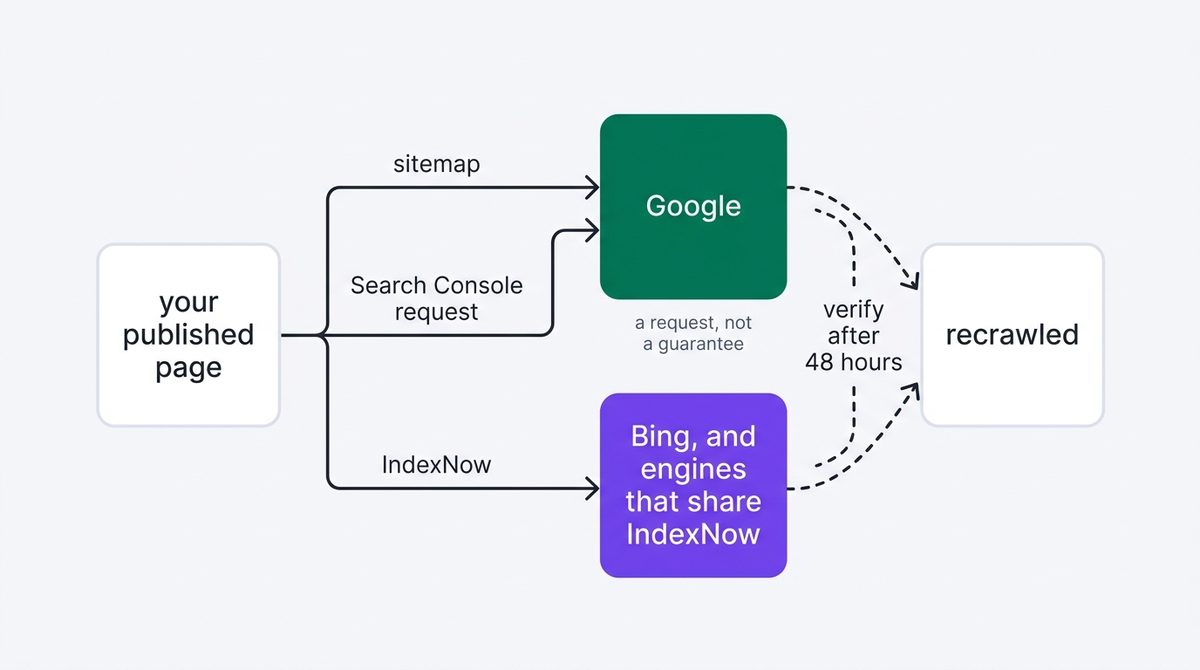
To get your page indexed faster, do three things in order after publishing, then verify at 48 hours. None of them force indexing, and Google says so in writing.

To get your page indexed faster after an edit, do three things in order: make sure it is in your sitemap, request indexing in Search Console, and submit the URL to IndexNow. Then verify two days later rather than assuming. None of this forces anything — Google states plainly that requesting indexing "does not guarantee that the page will appear in the Google Index" — but it removes every avoidable delay you control.
Read this first
Do this immediately after publishing the SEO rewrite checklist edits, and note the time. Everything below assumes the page returns 200 to crawlers; if it does not, pushing it harder achieves nothing.
Why you have to get your page indexed faster yourself
A crawler revisits on its own schedule, which for a small site can be weeks. Nothing about publishing tells anyone you published. The three steps below are simply the available ways to say "this URL changed" — two to Google, one to everyone else.
Publishing is not an announcement. Until something is told, nothing has been told.
Step 1 — confirm the URL is in your sitemap
Fetch your own sitemap and look for the URL. Most content systems add it automatically, and most of the exceptions are pages that were edited rather than created.
curl -s https://example.com/sitemap.xml | grep "your-page-slug"If nothing comes back, fix that before anything else — for multiple pages Google recommends submitting a sitemap rather than individual indexing requests, because sitemaps are not subject to the daily request quota.
Step 2 — request indexing in Search Console
Paste the URL into the inspection bar at the top of Search Console, wait for the lookup, then choose Request Indexing. Two things worth knowing before you rely on it:
- There is a documented daily cap — Google says "There is a daily limit to how many index requests you can submit" without publishing the number. Spend it on pages you actually changed.
- It is a request. Google's wording is that submitting one "does not guarantee that the page will appear in the Google Index", and the page still has to meet the usual bar.
On timing, Google's own estimate is that "Indexing typically takes only a day or so, but can take much longer in some cases".
Step 3 — submit to IndexNow
IndexNow is a shared protocol: submit once and participating engines are notified. Bing is the significant participant for our purposes, and it matters beyond Bing because its index feeds Copilot.
Generate a key of 8–128 hexadecimal characters, host it as a text file at your site root, then submit. The single-URL form is a plain GET:
KEY="your-key-here"
curl -s "https://api.indexnow.org/indexnow?url=https://example.com/your-page&key=$KEY" -w "%{http_code}\n"
For a batch, POST JSON — up to 10,000 URLs per request:
{
  "host": "www.example.com",
  "key": "your-key-here",
  "urlList": [
      "https://www.example.com/url1",
      "https://www.example.com/folder/url2"
      ]
}
Reading the response
IndexNow answers with a status code and nothing else. These are the ones you will see.
| Code | Means | Do |
|---|---|---|
200 | Accepted | Nothing |
202 | Accepted, key not yet validated | Check the key file is reachable |
400 | Bad format | Check the URL is escaped properly |
403 | Key invalid or missing | The key file is wrong, missing, or not at the root |
422 | URL does not match the host | The submitted URL is on a different domain than the key |
429 | Too many requests | Slow down; batch instead of looping |
Step 4 — verify after 48 hours
Re-inspect the URL in Search Console and read the crawl date. If it is after your publish time, the new version has been seen. If it has not moved, do not resubmit in a loop — check that the page is reachable to a crawler user agent, since a block will absorb any number of requests silently.
Three ways this goes wrong
Two of these waste your daily quota; the third wastes a fortnight.
- Requesting indexing repeatedly for the same URL. It does not add priority and it burns the cap you will want for the next page.
- Putting the IndexNow key file in the wrong place. A key hosted under a subdirectory can only validate URLs under that subdirectory. Root unless you have a reason.
- Assuming submission means indexed. Submission means notified. Indexing is still a decision, and the verification step in 48 hours is how you find out which one you got.
Common questions
Does IndexNow do anything for Google?
We are not going to give you a confident answer on that. Google has not committed to it the way Bing has, and we have not run the controlled test ourselves. What is certain is the Bing side, and Bing's index is what Copilot draws on — that alone justifies the one request.
How many URLs can I submit at once?
Up to 10,000 in a single POST. In practice, batching a day's changes into one call is both easier and less likely to be rate limited.
Should I automate this?
Yes, once it works by hand. The natural place is wherever your site publishes, so the submission happens without anyone remembering to do it.
Next step
The change is live and the engines have been told. Now comes the part that decides whether any of this was worth doing: waiting a defined period and reading the result against the baseline you recorded, instead of refreshing the dashboard daily and reading noise.
Pushing the update is mechanical. Knowing whether it worked, and what to do with each possible answer, is the last step — and it is why the baseline exists. QueryWin is being built to run this loop for you.
Part of the QueryWin handbook · Level 1